If you run a kirana store, general store, or small neighbourhood shop, you don't need a full GST tax invoice with GSTIN and tax breakup — most small stores in India issue a simple cash bill (often called a "kacha bill") that just lists what was bought, at what rate, and the total paid. This page shows exactly what that format looks like, with real samples generated by BillOnline's free Retail Bill Generator.
Generate a kirana-style bill in under a minute — no GST fields, no login, free.
Create Kirana Bill →What Is a Kirana Bill (Kacha Bill)?
A kacha bill is a simple, informal cash memo used by small shops that aren't registered under GST — which covers the majority of India's kirana and general stores. It's the opposite of a "pakka bill" (formal tax invoice), which is what GST-registered supermarkets and larger retail chains issue.
| Field | Kacha Bill (Kirana) | Pakka Bill (Tax Invoice) |
|---|---|---|
| GSTIN | Not shown | Required |
| GST / tax breakup | Not shown | CGST/SGST or IGST shown |
| MRP & discount | Not usually itemised | Shown per item |
| Item, quantity, rate | Yes | Yes |
| Total amount | Yes | Yes |
Why this matters: Small stores below the GST registration threshold are not required to charge GST at all. A kirana bill showing GSTIN or a tax breakup when the store isn't registered would actually be incorrect — the plain cash-bill format is the accurate one for these stores.
What a Kirana Bill Format Should Include
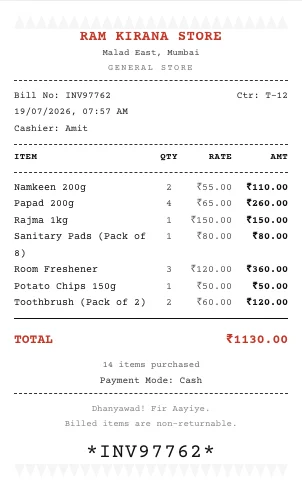
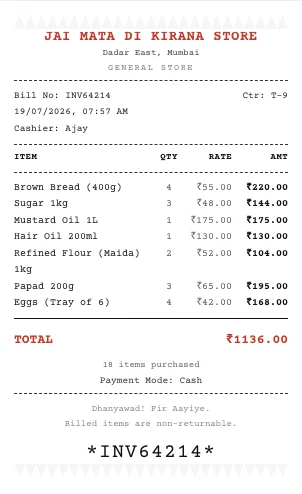
- Store name and address — shop name, area, and city
- Bill number — a simple sequential reference
- Date and time of purchase
- Item list — name, quantity, and rate per item
- Total amount — sum of all items, no tax breakup
- Payment mode — Cash, UPI, or Card
That's it. No GSTIN, no MRP-vs-discount columns, no CGST/SGST rows — just a clean, honest record of what was bought and what was paid.
Sample Kirana Bill Format
Here are two real bills generated using BillOnline's Kirana / General Store format — a narrow, thermal-receipt-style layout with a rustic tear-off edge, matching how many local stores print their bills:
How to Generate a Kirana Bill Online
- Open the Retail Bill Generator and select Kirana / General Store from the format dropdown.
- Enter store details — name, address and phone (GSTIN field is hidden automatically since this format doesn't use it).
- Set the bill amount range and item count — for example, ₹500 to ₹2,000 with 5 to 8 items — and click 🎲 Randomise to auto-fill a sample bill matching that range.
- Add your own items — item name, quantity and rate — using the simplified 4-column item form.
- Print or save as PDF using your browser's print dialog.
Pro tip: Your entered details are saved automatically in your browser, so returning to the tool restores your last bill instead of starting over.
Kirana Bill vs. Other Retail Formats
BillOnline's Retail Bill Generator also includes Supermarket, Grocery Store, Departmental Store and Thermal POS formats — all of which include full MRP, discount and GST breakup for stores that are GST-registered. The Kirana format is the only one built specifically for the common case of a small, unregistered local shop. See the full Retail Bill Generator guide for a comparison of all five formats and GST rates on common grocery items.
Frequently Asked Questions
Does a kirana store bill need GST?
Only if the store is registered under GST. Most small kirana and general stores fall below the registration threshold and issue a simple cash bill with no GST or GSTIN.
What fields does a kirana bill format need?
Store name and address, bill number, date, item list with quantity and rate, total amount, and payment mode — nothing more.
Can I generate a kirana bill online for free?
Yes. BillOnline's free Retail Bill Generator includes a dedicated Kirana / General Store format built exactly for this — no login, no watermark.